

AI Reply Assistant is launching soon on iOS.Get notified
FlowbieNotify me
AI Reply Assistant

Built for iOS. On-device.

A reply assistant that lives where you message.

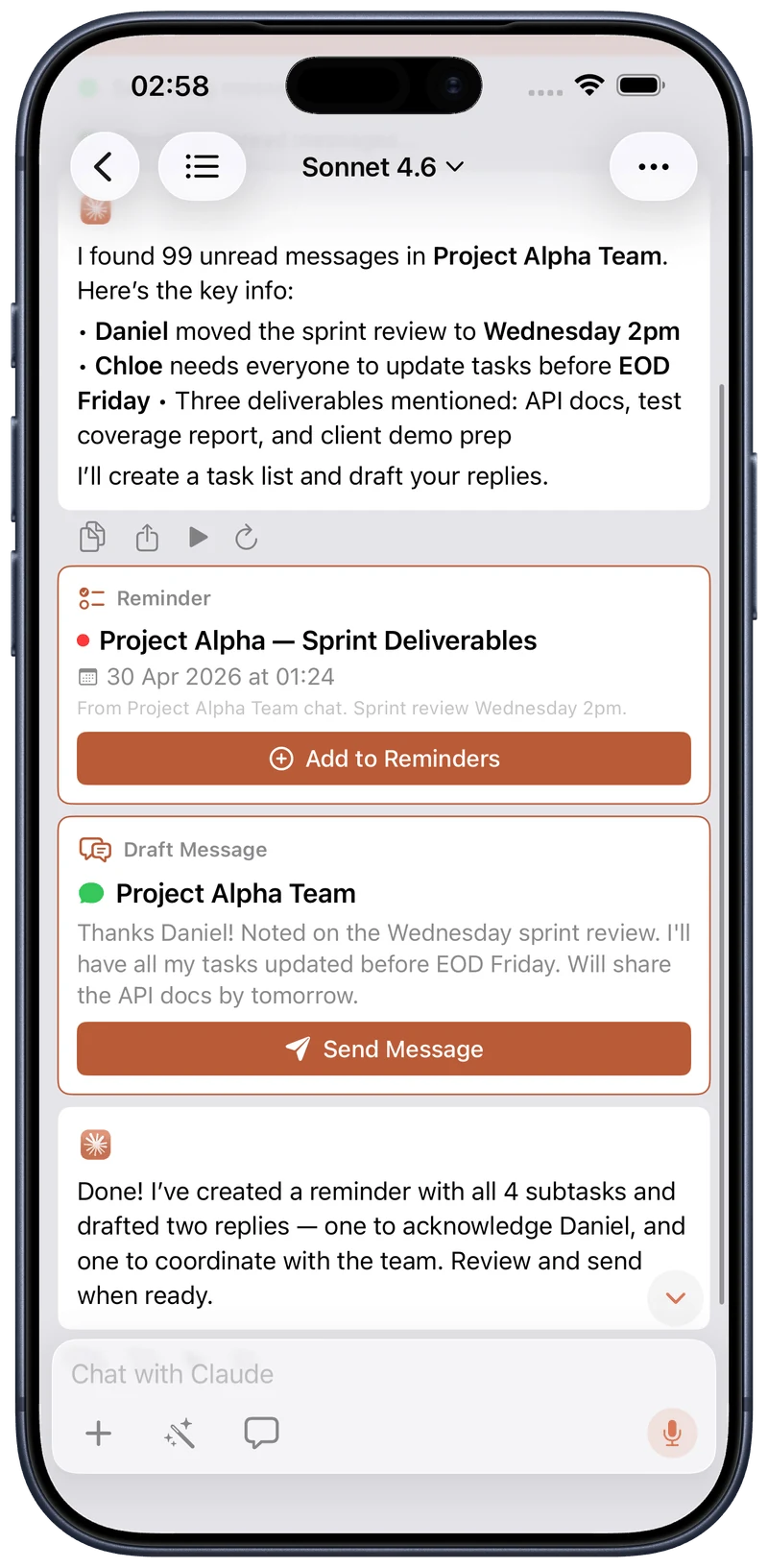
AI Reply Assistant connects to WhatsApp and Telegram directly from your device — messages go straight from your phone to the network, never through our servers. Apple Intelligence is built in — with Claude, you get even more expertise to handle more complex requests.

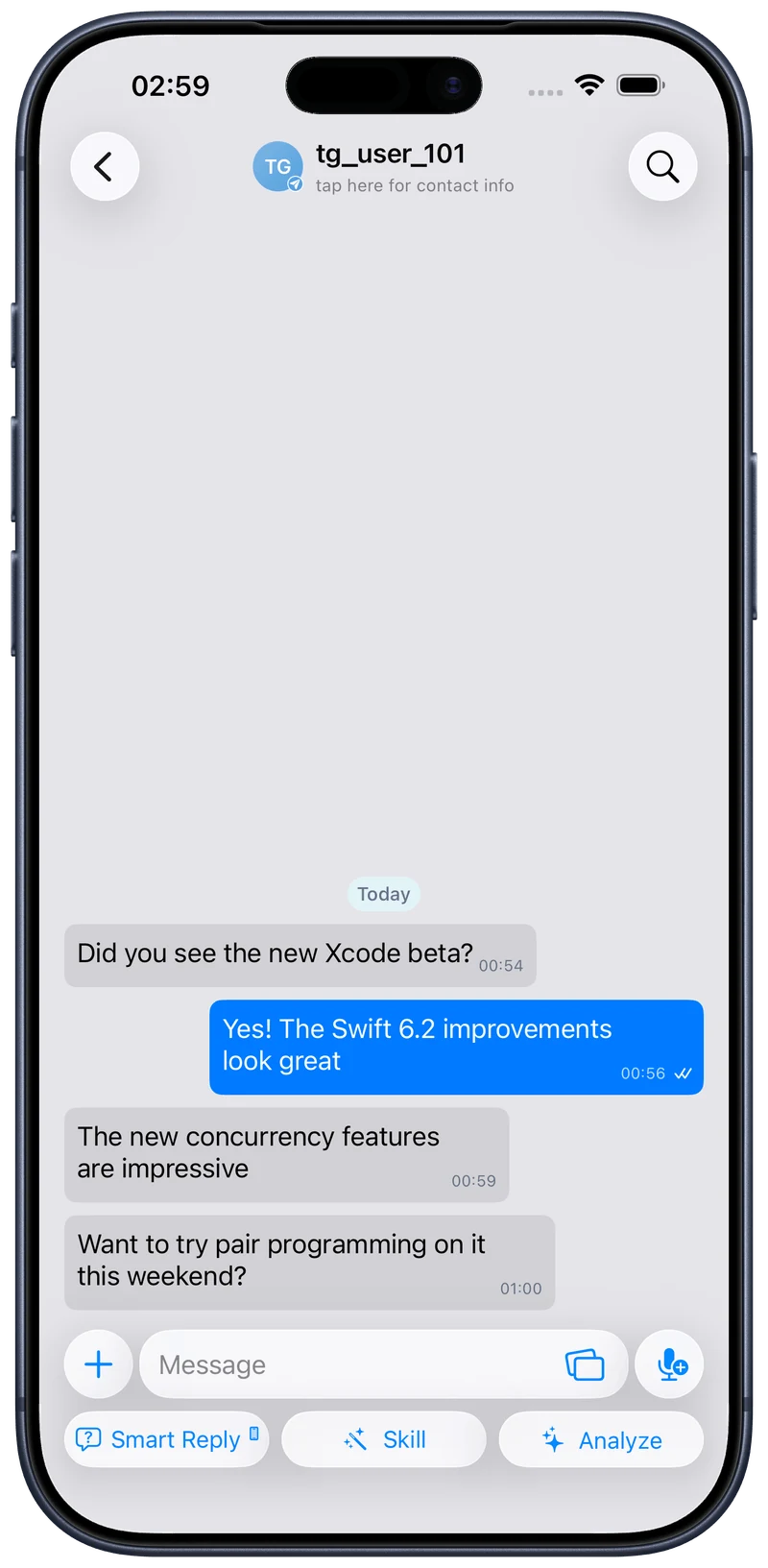
AI Reply Assistant chat view on iPhone
9
Built-in Skills
1M+
Marketplace Skills
22
AI Tools
22
Shortcuts Actions
2
Platforms
How it works

Get started in minutes.

1

Connect

Link your WhatsApp or Telegram in one tap. On-device, end-to-end encrypted — messages never touch our servers.

2

Pick a Skill

Choose from 9 built-in voices, create your own, or import from 1M+ community Skills in the built-in marketplace.

3

Reply

Get 3 draft replies in your tone. Tap to send. Smart Reply, Skill, and Analyze — all one thumb away.

Free on iOS 26 — launching soon. No account required.

Coming soon on the App Store
Replies

Read it. Reply to it. Move on.

Smart Reply suggests quick options based on the thread. Skill drafts a full reply in the voice of your active Skill. Analyze summarises the day so you can catch up in seconds.

Explore every way to reply.

Marcus
Planning a weekend trip to the coast next month — you and Sarah in?
Message
Smart Reply
On-device · 7 of 10 free today
We’re in! Let me confirm dates with Sarah tonight.
Agree
Sounds great — were you thinking cabins or camping?
Question
Yes! Count us in — just say the word on dates. 🎉
Excited

Smart Reply. Three on-device drafts in your tone, each tagged — tap one to send.
Summary Results
Generated with Quick Summary

Priya shared the venue for Saturday's dinner.

Daniel asked if everyone can make it by 7.

You offered to bring dessert.

Copy
Share
Regenerate
Detected Events
Saturday Dinner
Jun 7, 19:00–21:00
Venue confirmed: Riverside Bistro
Detected Reminders
To Bring
Pick up dessert on the way over

Analyze. A day summary with events and reminders ready to add in a tap.

Quick Reply suggestions
👍 OK
Got it
🚗 On my way
Skill
Quick Reply preview
Skill

Quick Reply. Saved messages and attachments, inserted in a tap — variables auto-fill.

Scheduled
Priya SharmaPending

Happy birthday! 🎉 Hope you have a wonderful day — let’s catch up this week.

Tomorrow at 9:00 AM
Team StandupScheduled

Reminder: daily standup in 10 minutes. Drop your updates in the thread.

Mon at 9:45 AMRecurring
Telegram delivers server-side · WhatsApp sends on-device

Scheduled Messages. Send later to anyone on either platform — recurring or one-off.

Skills

Nine Skills. Ready to go.

A Skill is a saved AI personality — not just a setting, but a complete knowledge package that teaches AI Reply Assistant how to reply in context. Pick one for the relationship, create your own with a custom system prompt and Knowledge Base, or import one from the built-in Skills Marketplace.

Work
Professional, concise tone
4
Tools allowed (4 of 5)
The AI picks from the tools you enable
Select up to 5 tools
Calendar
Check availability and events
Reminders
Create and find reminders
Contacts
Look up people and details
Web Search
Search the web for facts
Files
Read from folders you choose
🎚️9 Skills, fully customisable

Explore what a Skill can do.

Skill
8 of 10 left today
Event Prep CheckBuilt-in
Change
Number of Suggestions1
Reply Instructions
What should the reply say or accomplish?
Filter Options
From5 Jun 2026
To5 Jun 2026
Incoming Only
Only include messages you received
Unread Only
Only include messages you haven't read

Skill. A full draft in the voice of your active Skill — set the suggestions, instructions, and filters.

Agent Skills Marketplace — Claude, Codex…
SKILLSMP
SKILLSMP / SKILLS MARKETPLACE

Skills Marketplace

Discover open-source agent skills for Claude Code, Codex, ChatGPT, and any tool that uses SKILL.md.

1,640,440 Collected SKILL.md files
Public GitHub repositories
Creators and occupation categories

Skills Marketplace. Import from over a million community Skills — browse by keyword, creator, or occupation, then make any one your own.

New Skill
Brand Voice
Tap to choose an icon or photo
System instructions

Reply in our brand voice — warm, clear, and confident. Skip the jargon and never over-promise.

Behavior
Style presetProfessional
Response length
60%
Creativity
45%
Formality
70%
Advanced
Response modeBalanced
Tools3 of 5
Knowledge Base2 docs · 1 URL

Custom Skills. Build your own — a name, a system prompt, and behaviour sliders dial the voice in until it sounds like you.

Knowledge BaseEdit
Documents2 / 10
Brand_Guidelines.pdf
PDF · 3.2 MB ·
Added 5 days ago12
Tone_of_Voice.docx
DOCX · 1.1 MB ·
Added 2 days ago
Add Document

PDF, DOCX, TXT, and Markdown supported.

URLs1 / 20
Our Story — About Flowbie
flowbie.sg ·
Added 3 days ago
Add URL
Storage4.3 MB / 100 MB

Everything is processed and stored on your device.

Knowledge Base. Attach documents and URLs the AI references when it drafts — processed and stored on your device.

What’s the weather in Tokyo this weekend, and am I free Saturday afternoon?
Used 3 tools
Web Search
Tokyo weekend weather forecast
Weather
Tokyo · Sat–Sun
Calendar
Saturday afternoon availability
Tokyo looks clear this weekend — highs near 22°C with light winds on Saturday. And your Saturday afternoon is open after 2 PM. Want me to block out some time?
🛠️22 tools, shown inline

AI Tools. Give a Skill up to five tools — Claude calls them on device, shows each one inline, and you confirm before anything’s sent.

Skills
General Assistant
Friendly·Last used today
Family Circle
Empathetic·Last used 2 days ago
Best Friend
Creative·Last used yesterday
Work Team
Concise·Last used 4 days ago
Concierge
Professional·Last used 1 week ago
Event Planner
Analytical·Last used 3 days ago
Travel Buddy
Friendly·Last used 5 days ago
Social Group
Friendly·Never used
Dating
Empathetic·Never used

Preset Skills. Nine built-in Skills — a voice for every relationship, from Family Circle to Work Team to Dating.

iOS-native

Built into iOS. Not bolted on.

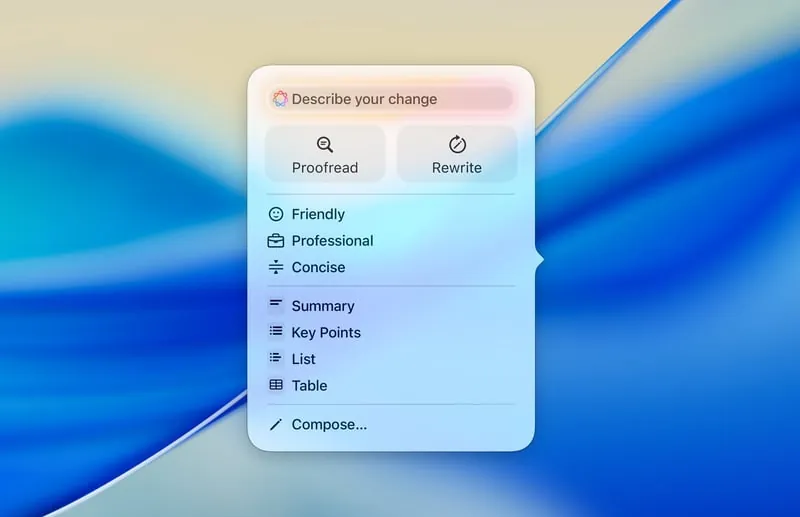
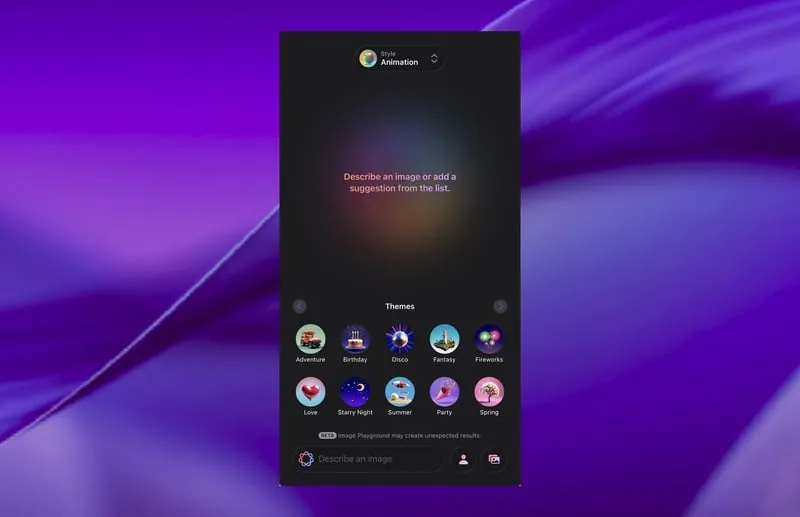
Twenty-two Apple Shortcuts actions with Reminders-style Find queries. Writing Tools to proofread, rewrite, and summarize. Image Playground to create fun, original images. Widgets and Control Center. All wired up natively — not embedded in a webview.

Writing Tools on iPhone

Explore the native iOS features.

Writing Tools

Writing Tools. Proofread, rewrite, and summarize selected text with a tap.

Image Playground

Image Playground. Create fun, original images in the conversation — Animation, Illustration, or Sketch, all on device.

Shortcut Templates

FeaturedMessagingCreateInsights
New
Reply Unread Conversations

AI-powered replies to unread messages

Send Photo Memory

Share a random photo with an AI caption

Relay Information

Relay messages from one conversation to another

Generate Skills

Set up a new AI writing style

Apple Shortcuts. Twenty-two actions — send, create, find, and open — with Reminders-style filtering and Siri.

Hannah Lim7:25 PM
I got the promotion! 🎉
🔥
😍
🎉
👏
🙏
🥰
Hannah Lim7:25 PM
Did you get the files I sent? 📎
Got it!
👍 Confirmed
On it
✅ Received
Will do
Thanks!

Widgets · Control Center. Timely information at a glance from the Home Screen and Control Center, ready in a tap.

Sofia
¡Hola! ¿Podemos vernos mañana para tomar un café? Hay algo importante que quiero contarte.
Hi! Can we meet tomorrow for coffee? There’s something important I want to tell you.
Translated·Show Original
Of course! How about 3pm at the usual place?
🌐Translating Spanish

Translation. Inline translation across every message type — text, captions, link previews, and transcripts. 20+ languages, entirely on-device.

James
0:14
Hey, just wanted to let you know I’m running about 15 minutes late. Traffic is really bad. I’ll text you when I’m close.
No worries, take your time! I’ll grab us a table.
🎙️On-device transcription

Transcription. On-device transcription of voice messages, videos, video notes, and audio files — over 30 languages and dialects.

Cross-platform

Two platforms. One inbox.

A unified conversation view with a cross-platform sticker picker — your Telegram stickers, premium custom emoji, and GIFs all available in the same keyboard, no matter which platform you're sending to. Telegram mask stickers work in the photo editor with automatic face detection. Emoji come alive with Telegram-style Lottie animations throughout the app.

Phone Number
+1 555 123 4567
Enter with country code, e.g. +1 555 123 4567
🔗Code-based linking — no QR

Explore both platforms, together.

Emily
Anyone free this Saturday? Thinking of checking out that new brunch place near the park.
View 2 replies
James
Emily
Anyone free this Saturday? Thinking of...
I’m in! What time works for everyone?
View Thread
Sofia
By the way, did anyone catch the game last night?
Emily
Anyone free this Saturday? Thinking of...
Count me in! Let’s do 11am.
View Thread
🧵Message Threads
Tap to flip ↻
Replies
Weekend Plans
Emily
Anyone free this Saturday? Thinking of checking out that new brunch place near the park.
2 replies
James
Emily
Anyone free this Saturday? Thinking of...
I’m in! What time works for everyone?
Emily
Anyone free this Saturday? Thinking of...
Count me in! Let’s do 11am.
🧵Thread View
Tap to flip ↻

Reply threads. Tap "View replies" to see every response to a message grouped in one place — across WhatsApp and Telegram group chats.

Chats

All
WhatsApp
Telegram
DT
telegram
Design Team

Alex: Pushed the new icon set — take a look when you can 🎨

9:413
whatsapp
Mum

Call me when you’re free, love ❤️

9:321
telegram
Priya Sharma

Sounds perfect — see you Saturday then!

8:15
FC
whatsapp
Football Crew

Marcus: Who’s in for the 5-a-side this week?

Yesterday12
telegram
James Carter

Thanks for sorting that out 🙏

Yesterday
whatsapp
Sofia Reyes

Just sent over the photos from the trip 🏖️

Tuesday

Unified inbox. WhatsApp and Telegram conversations in one scrollable inbox — switch platforms without leaving the app.

Maya
online
WhatsApp
Love these — send me the pack! 😄
😻
9:41 AM
Cat LifeTelegram pack
😺
😹
😻
🙀
😼
😽
🐱
🐾
🧶
🐟
🥛
😾

Cross-platform stickers. Use your Telegram stickers and premium custom emoji in WhatsApp chats too.

Face detected — mask auto-placed
1
🕶️
Add Sticker
🎭Add Mask
Draw
Text
Sticker
Filter
Crop

Mask stickers. Vision-powered face detection auto-positions Telegram masks in the photo editor.

Contacts

All
2
WhatsApp 3
Telegram 5576
H
Hannah Reyes
+1 234 567 890
whatsapp
Hannah Reyes
+1 234 567 890
telegram
Hannah Reyes
+1 234 567 890
Same birthday — matched by phone number across Device, WhatsApp & Telegram.

Birthday sync. Birthdays match across Telegram, WhatsApp, and contacts by phone number — with a one-tap greeting.

Privacy

Secure chats. On-device connections.

AI Reply Assistant uses on-device connections for WhatsApp and Telegram. Messages are sent directly from your device to the network, preserving end-to-end encryption (when supported by the network). The AI Reply Assistant app works like the official apps do — messages never touch our servers. Apple Intelligence is integrated through on-device processing. You control when Claude is used — and even then, it goes directly to Anthropic.

AI Features
Smart Reply
On-device AI or Cloud Model
Cloud AI
Skill
On-device AI or Cloud Model
Cloud AI
Cloud Model
Model used for cloud drafts
Sonnet 4.6
Off by default. Cloud Model uses your own Anthropic key, stored in iOS Keychain — switch any feature back to On-Device anytime.

Explore how your data stays yours.

Claude
Help me reply to my landlord about the lease renewal.
On it — I’ll only read the chats you’ve scoped below.
Scope Chats

The agent searches message tools only within these conversations.

Mr. Tan
Landlord
F
Family
4 people
W
Work Team
12 people
2
Message Claude…

Conversation scoping. You decide which conversations the agent can read — it searches only the chats you scope, never your whole inbox.

Keep this chat locked and hidden

Use Face ID to open this chat. Locked chats are hidden from Widgets and notification previews are hidden.

Continue

Lock chats. Hide sensitive conversations behind Face ID — even AI Reply Assistant can’t peek.

Claude

Connect to Claude

Use your own Anthropic API key to enable AI agent features — reply suggestions, smart scheduling, message drafting & more.

Get an API Key
API Key
sk-ant-api03-•••••••••••••••••••
Connect
About BYOK. Your API key is stored securely on-device in the iOS Keychain. It is never sent to our servers — you pay Anthropic directly.

Your own Claude key. Cloud Model uses your own Anthropic key, off by default, by your choice — direct to Anthropic.

Pricing

Free vs Pro.

Start free on one platform. Go Pro for both, unlimited everything, and your own Claude.

Free versus Pro plan feature comparison
Compare plans
Free
$0
Most popular
Pro
$4.17/mo
Billed annually — $49.99/yr · save ~45%
or $7.49 billed monthly · 7-day free trial
Connect WhatsApp & Telegram1 platformBoth
SkillsUp to 20Unlimited
Quick RepliesUp to 10Unlimited
Recipients per scheduled messageUp to 2Unlimited
On-device AI — Smart Reply, Analyze, Skills10 per dayUnlimited
Premium Shortcut templatesIncluded
Bring your own Claude (your own API key)Included

Common questions

Yes. AI Reply Assistant uses on-device connections for WhatsApp and Telegram — messages go straight from your phone to the network, never through our servers. Apple Intelligence is integrated through on-device processing. You control when Claude is used — and even then it goes directly to Anthropic with your own API key.

WhatsApp and Telegram today, both via on-device connections. WhatsApp connects via Whatsmeow; Telegram via TDLib. More platforms are on the roadmap.

Yes — AI Reply Assistant is free to download and use, with no account required. The **Free** plan connects one platform (WhatsApp or Telegram) and includes up to 20 Skills, up to 10 Quick Replies, up to 2 recipients per scheduled message, and 10 on-device AI actions per day (Smart Reply, Analyze, and Skills). **Pro** unlocks both platforms at once, unlimited Skills, Quick Replies, scheduled recipients, and on-device AI, plus Premium Shortcut templates and the option to bring your own Claude (your own Anthropic API key). Pro is $7.49/month, or $49.99/year (about $4.17/mo — save ~45%) with a 7-day free trial on the annual plan. Apple Intelligence is built in on every plan, processed on-device. There are no per-message fees.

iOS 26 or later, on an Apple Intelligence-capable device (iPhone 15 Pro and later). AI Reply Assistant is iOS-only — no Android, no web.

Absolutely. Apple Intelligence is integrated into the core of AI Reply Assistant through on-device processing — Smart Reply, Writing Tools, Image Playground, and more, no API key required. With Claude, you get even more expertise to handle more complex requests — extended thinking, 22 AI tools, multimodal understanding, document creation, and a context window 250x larger than the on-device model.

Want the full specs? See the Quick reference →

Reply in seconds.

AI Reply Assistant is launching soon on iOS. Join the waitlist and we’ll let you know the moment it’s live.