Connect in a minute. Nothing leaves your phone.
Four messaging platforms and Claude, all from one screen. Every connection is made on your device and its credentials stay in the iOS Keychain — messages go straight from your phone to the network, and we never see your password or your API key.
Where you connect and disconnect
Everything lives on one screen. Tap Platform — the link icon, first in the tab bar — to open Connect Platforms. Each network is a card with one button on it, and Claude sits below the divider on the same screen.
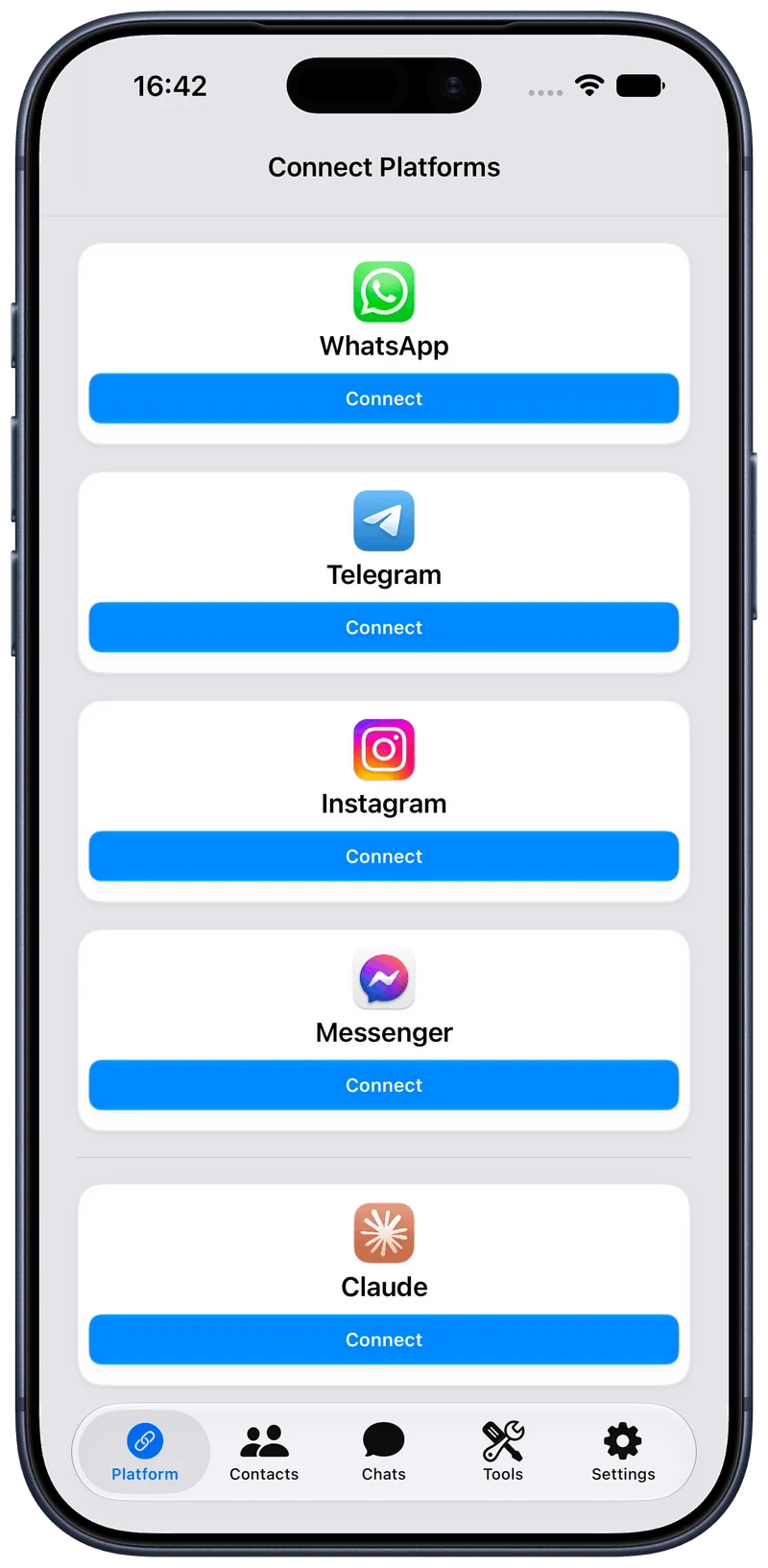
The blue button on a card starts that platform’s flow — the one stepped through below. The Free plan connects one messaging platform at a time; Pro connects all four. Claude’s card is never gated: AI Credit needs no subscription.
Once linked, the same button reads Disconnect. Tapping it logs you out and clears that platform’s local data from this device. Nothing is left behind on a server of ours, because nothing was there.
If a session expires, the card says so and the button turns orange. Tap it to sign back in — the conversations already on your device stay put.
Step through each flow
Each one links a little differently — a code you enter for WhatsApp and Telegram, a sign-in plus Meta’s own security prompts for Instagram and Messenger, and two funding routes for Claude. Pick a tab to walk every screen it puts in front of you, in order.
Once linked, all four platforms appear in one unified inbox — switch or combine them without leaving the app, with Claude available in any of them.
Connecting — common questions
Yes — over WhatsApp’s Multi-Device protocol, which links AI Reply Assistant as a companion device the same way WhatsApp Web and Desktop are linked. End-to-end encryption is preserved and nothing routes through our servers.
Text, media and documents, voice messages, reactions, stickers, polls, group chats, disappearing messages, scheduled sends and broadcasts all work — as does the one thing the WhatsApp app itself gives you no way to write: an interactive message with tappable buttons, sent from an ordinary personal account. Live location is partial, and voice and video calls are not supported. Both WhatsApp Personal and the WhatsApp Business App are supported — the account-types question below has the detail.
Yes — on-device via TDLib, Telegram’s official client library, so messages reach Telegram’s network exactly as the official apps’ do.
Telegram is the widest surface of the four. Text, media, voice messages, reactions, stickers, polls, group chats, channels and forum topics all work, alongside the Telegram-specific touches: silent send, slow mode, and forward options that hide the sender or drop the caption. Scheduled messages are held by Telegram’s own servers and fire at the exact second, even with the app closed. Bots are supported in full — commands, inline and reply keyboards, Mini Apps, inline mode and Stars payments — though you cannot sign in as a bot. Voice and video calls are not supported.
Yes — your direct messages, through the Messagix bridge running on your device. They sit in the same inbox as the other three, with text, media, voice messages, reactions, stickers, group chats and scheduled messages.
Instagram is the most restricted of the four, and the limits are worth knowing before you rely on it. Documents and PDFs are not accepted. There is no disappearing-message timer — Instagram’s Vanish Mode is controlled from Instagram itself — and no continuous live location. Polls work in group chats only. And location and contact sharing go through as a maps link and a formatted text message rather than native cards, because Instagram’s DM API has no native card for either.
The row-by-row picture is in “Which features work on each platform?” on the FAQ.
Yes — through the Messagix bridge running on your device. Your Messenger chats join the same inbox, with text, media including documents, voice messages, reactions, stickers, group chats and scheduled messages.
Four things behave differently. Disappearing messages can only be set in end-to-end encrypted chats. Polls work in group chats only. There is no continuous live location. And location and contact sharing go through as a maps link and a formatted text message rather than native cards, because Messenger’s API has no native card for either.
The row-by-row picture is in “Which features work on each platform?” on the FAQ.
Both WhatsApp Personal (for individuals) and the WhatsApp Business App (for small businesses) are fully supported. In short: if you use the WhatsApp or WhatsApp Business app on your iPhone, AI Reply Assistant works with your account.
You connect by entering your phone number and a pairing code, which links AI Reply Assistant as a companion device over WhatsApp's Multi-Device protocol — any account that supports linked devices works.
It does not use the WhatsApp Business API/Platform (also called WhatsApp Cloud API) — a separate, server-side product built for medium and large enterprises to send automated messages at scale through third-party providers. Here is how the two approaches compare:
| AI Reply Assistant | Business API / Platform | |
|---|---|---|
| Runs as | Linked device on your iPhone | Server-side integration |
| Works with | Personal + Business App accounts | Enterprise setups only |
| Setup | Phone number + pairing code | Developer or Business Messaging Partner |
| Messages | Sent device-to-network directly | Routed through third-party servers |
| Encryption | End-to-end preserved | Handled server-side |
| Charges | No per-message charges | Per-message charges (marketing / authentication) |
| Built for | Personal & small business | Automated, high-volume messaging |
AI Reply Assistant supports every kind of Telegram user account — Personal, Premium, Business, and Anonymous/Numberless. You connect with your phone number and a verification code via Telegram's Client API (TDLib), the same technology behind Telegram Desktop and the other official clients.
Premium perks (faster downloads, exclusive stickers, higher limits) and Business tools (operating hours, location sharing, automated greetings, quick replies, and more) all carry over and work alongside AI Reply Assistant's own features. Anonymous/Numberless accounts created with blockchain-based numbers (e.g. via Fragment) work too — just enter the Fragment number like any other; AI Reply Assistant does not distinguish between SIM-based and Fragment-based numbers.
Bot accounts cannot be logged into. Telegram bots are created via @BotFather, have no phone number, and can't authenticate through TDLib — so you can't sign in as a bot. You can still receive and reply to bot messages in your inbox. AI Reply Assistant does not use the Telegram Bot API; your messages go straight from your device to Telegram's network using the same protocol as the official app.
| Account type | Supported |
|---|---|
| Personal (free) | ● |
| Premium | ● |
| Business | ● |
| Anonymous / Numberless | ● |
| Bot accounts (sign-in) | ○ |
On iPad, yes — AI Reply Assistant runs on iPhone and iPad, so all four networks read and reply on a bigger screen. It is not offered on Mac.
An iPad links the same way an iPhone does, as a companion device of its own: this is not WhatsApp Web, and nothing is mirrored through a browser or through a server of ours.
AI Credit requests pass through Flowbie's relay so they can be metered against your balance — that is its only job. The relay keeps no copy of your conversation: content is forwarded to Anthropic and never stored, and our logs carry only billing metadata — the model used, token counts, and cost. Your balance is keyed to your Apple Account, not to your messages.
Anthropic serves these requests under its commercial terms: API traffic is not used to train its models, and inputs and outputs are retained by Anthropic for a limited period (currently up to 30 days) under its own data-retention terms. If you bring your own API key instead, requests skip Flowbie entirely and run under your own Anthropic account. Full details in the Privacy policy.
Your personal AI assistant for messaging.
Download AI Reply Assistant on iOS and try it free.